Product · WeaveAI Cite
Get your business named when people ask AI.
WeaveAI Cite is AEO for any business with a website: getting you named in answers from ChatGPT, Perplexity and Google's AI Overviews. It writes articles on a schedule, posts them to your site, and shows you which ones people find and visit, and which ones AI quotes.
58%
fewer clicks on Google's top result when an AI summary appears above it
Ahrefs, Dec 2025, 300k keywords3 to 6 months
before visitors usually arrive from search. Google starts showing your pages within days. Cite shows you both from day one.
Setup, a run, and what it reports back. Under a minute.
Connect once. It runs daily.
Cite plans, writes, posts and checks your articles for you, start to finish.
Tell Cite about your business
Say what you offer, who it is for and a few topics you know well. That is the whole setup. There is no content calendar to fill and no brief to write.
It writes on a schedule
Each run finds real questions people ask about what you offer, picks the ones most likely to bring you customers, and writes an article that answers them clearly, in the shape AI tools quote from.
It posts and reports back
Approve an article, or let autopilot do it, and it is on your WordPress site within seconds, as a draft or a live post. Cite checks the page is up, then reads your Google traffic numbers every day and tells you how each article is doing and one thing to do about it.
What you see once it is running.
The two screens you will spend your time in, with a sample project in them.
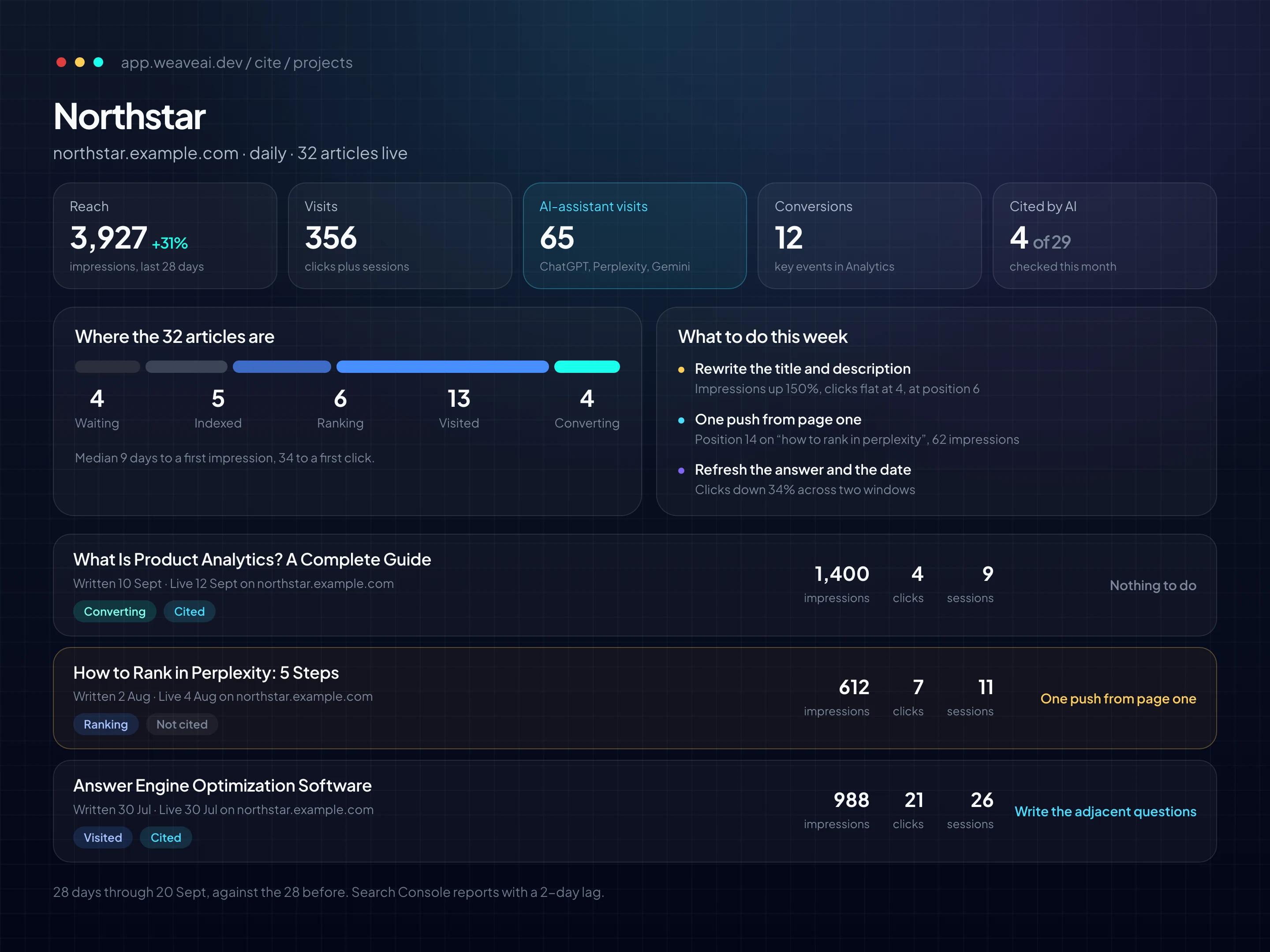
Every article carries its own numbers
Search Console and Analytics, attached to each article and turned into one stage and one thing to do. Search Console is on every plan; Analytics needs Starter, and the citation check needs Growth.
- Five stages, in order: waiting, indexed, ranking, visited, converting.
- One next action when there is one. Check it is reachable. Rewrite the title. Refresh it. One push from page one.
- A live article links to the page. A draft links into WordPress.
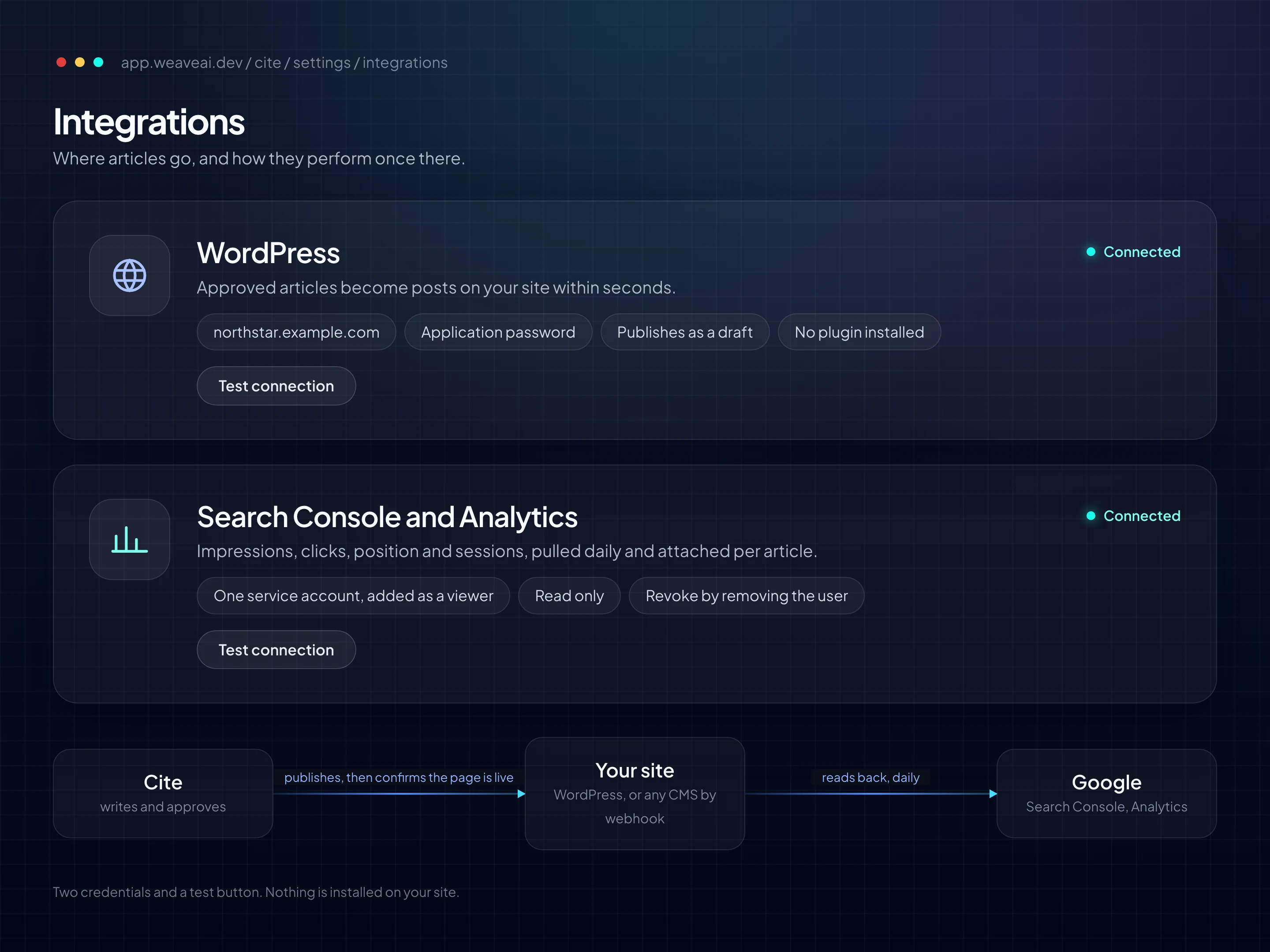
Two connections, no plugin
Setup is two connections and a test button.
- WordPress takes your site address, your username and an app password you create in WordPress.
- Google Search Console and Analytics take one Cite email address, added as a viewer.
- Test the connection before anything publishes.
Priced per article, not per seat.
Every plan does the whole job: finding the questions, writing the articles, posting them on a schedule to WordPress, and showing how they do in Google search. You pay for how many articles you get. Annual billing saves 20 to 25%.
Free
$0 / mo
No card required
5 articles / mo on 1 site
- Runs by itself every week
- Posts straight to WordPress
- See how each article does in Google search
- A Slack, Discord or Teams message if anything stops
- A quality score and an FAQ section on every article
- Copy any article into any website builder
Starter
$9.99 / mo
or $7.99 / mo billed annually ($95.88 a year)
30 articles / mo, any number of sites
- Runs by itself every day
- Posts to WordPress, or hands each article to your own tools automatically
- See how each article does in Google search, and how many people visit it
- A Slack, Discord or Teams message if anything stops
- Email support
Growth
$19.99 / mo
or $14.99 / mo billed annually ($179.88 a year)
80 articles / mo, any number of sites
- Everything in Starter
- More than double the volume
- Twice as many topics weighed on each run
- A monthly check on whether AI quotes each article, up to 40 a project
- Priority support
Impressions show within days. Clicks typically take three to six months. We show you both from day one.
Prices in USD before tax; local taxes and currency are applied at checkout. Paid plans put no limit on sites; one site caps at 30 articles a month, because daily is the tightest cadence and a run writes one article, so Growth's 80 is meant to be spread across several.
Built to be quoted, published and measured.
Every design decision serves one outcome: your business showing up inside the answer, and you knowing whether it did.
Answers first
Every article opens with a short, complete answer, uses headings written as questions and ends with an FAQ section. That is the shape AI answers are pulled from.
Checked before it goes live
Each article is graded before it publishes: does it answer the question directly, is it easy to skim, are its title and description filled in, and does it stay on topic.
Works with WordPress
One post per article, never a duplicate, as a draft for you to review or live on autopilot. Not on WordPress? Copy each article into any website builder.
Your traffic, per article
Connects to Google Search Console and Analytics to show how often Google shows each article, how many people click and visit, and whether search, an AI assistant or a link sent them. Every number says which dates it covers.
It tells you when it stops
A Slack, Discord or Teams message the day writing or publishing stops. Autopilot that fails quietly is the failure this product was built against.
Every run on record
Every run is logged: which topics it found, which it picked and what it wrote, with what each article cost to produce.
Running on a real content calendar.
TruFeed is a user feedback platform. Cite writes its blog.
We published maybe two posts a month, whenever someone remembered. Cite just runs. I review the writing now instead of doing it.
Safe with your logins and your data.
Each point below describes how Cite works today, not a policy we intend to follow. Need a DPA or a security questionnaire filled in? Ask.
Your WordPress password is encrypted
The app password you create for Cite in WordPress is stored encrypted and never shown again, on any screen. You can replace it from your WordPress profile at any time.
Google access is view-only
Cite can read your Search Console and Analytics numbers, not change them. You add Cite as a viewer and remove it whenever you like.
Nothing installed on your site
There is no plugin to install or keep updated. Cite sends that password only to your own site, never on to anywhere else.
Your data is kept separate
Your organisation's data is walled off from every other customer's. Deleting a project removes its articles, numbers and saved passwords with it.
Technical details
- Publishing
- WordPress publishing uses the WordPress REST API and an application password; there is no plugin. One post per article, never a duplicate. Requests to your site never follow redirects, so credentials are never replayed to another host. Any other CMS takes the MDX or HTML export; the HTML export includes FAQ schema.
- Webhook (Starter and up)
- Every approved article is POSTed as JSON to a URL you choose, with the article as HTML or Markdown (your choice), the FAQ, the SEO fields and where it was published, so an n8n flow, a Make scenario or your own code can publish it to any CMS. You set a bearer token, Cite sends a sample event to prove the connection, and failed deliveries are retried for a day.
- Alerts
- Sent over a Slack, Discord or Teams webhook when a run or a publish fails.
- Credentials
- Your WordPress application password is stored with AES-256-GCM and never returned by any API or screen. Rotate it from your WordPress profile at any time.
- Google access
- Cite reads Search Console and GA4 through one service account with read-only scopes. You add it as a viewer on your property and revoke it by removing the user.
- Measurement
- Impressions, clicks and position from Search Console. Sessions and key events from GA4, split by whether search, an AI assistant or a link sent the visitor. Both are linked to each article automatically, and every number states its window and its lag.
- Quality check
- A citability scorecard grades each article before it publishes: direct answer, scannability, metadata and keyword discipline.
- Data and isolation
- Articles, metrics and settings live in a Postgres database. Row-level security scopes every table Cite writes to your organisation. Deleting a project removes its articles, metrics and credentials with it.
- Run logs
- Every run logs the keywords found, scored, selected and written, with token usage and compute cost attached to each article.
Questions buyers ask us.
Direct answers, the same way Cite writes them. Updated 22 September 2026.
What is WeaveAI Cite?
WeaveAI Cite is an autonomous AEO content engine for any business with a website. It finds the questions your customers ask AI, writes answer-first articles on a schedule, publishes them to your WordPress site, confirms each page is live, and tells you per article whether it is being found and visited, on Growth whether AI cites it, and what to do next. If it stops, it tells you.
How is Cite different from AI writing tools like Jasper or Surfer?
Those are editors: a person still plans, prompts, reviews and publishes. Cite is an autonomous engine. It discovers the questions your customers ask, decides what is worth writing based on purchase intent, writes it, publishes it to your site, confirms it is live, and reports what happened to it.
What is Answer Engine Optimization (AEO)?
AEO is the practice of structuring content so that AI systems such as Google AI Overviews, ChatGPT and Perplexity quote it as a source. Instead of chasing blue-link rankings, AEO content leads with a direct, self-contained answer, uses question-shaped headings, and ships machine-readable FAQ schema.
How do articles get onto my site?
Connect WordPress once with an application password; there is no plugin. Every approved article becomes a post within seconds, as a draft for you to review or live on full autopilot, and never a duplicate. Any other CMS takes the MDX or HTML export; the HTML export includes FAQ schema.
Does Cite have a webhook or an API?
Yes. On Starter and up, Cite sends every approved article to an address you choose, so an n8n flow, a Make scenario or your own code can post it to any website. It proves the connection with a sample first and retries failed deliveries for a day. Alerts go to Slack, Discord or Teams when a run or a publish fails. Each delivery is JSON with the article as HTML or Markdown, its FAQ and its SEO fields, secured by a bearer token you set.
What will I actually see in month one?
Impressions within days, once Google indexes the pages. Position from the first week. Clicks usually take three to six months of consistent publishing, and Cite shows you every number from day one rather than hiding the wait. Google Analytics adds who read each article, and whether an AI assistant sent them. On Growth, a monthly check asks an answer engine each article's question and records whether it was cited.
What happens when I hit the free limit?
Five articles a month on the free tier, published to your WordPress like any other, then the engine waits for next month. Everything already published keeps reporting Search Console numbers in the meantime. Starter raises the cap to thirty a month, runs daily, and adds Google Analytics and the webhook.
Do I need a content team to use it?
No. Cite is built for any business with a website and no dedicated content people. You describe your product once; the engine handles discovery, writing, publishing and measurement on a schedule you pick.
Where is my data stored, and can I get it out?
Articles, metrics and settings live in a Postgres database with row-level security per organisation. Every article exports as MDX or HTML at any time, and deleting a project removes its articles, metrics and stored credentials.
Start now
Your customers are already asking AI. Be the answer.
Tell Cite about your business, start a run, and read your first article a few minutes later. Then watch what it does.